ascensia diabetes care

The Contour App, Redesigned.

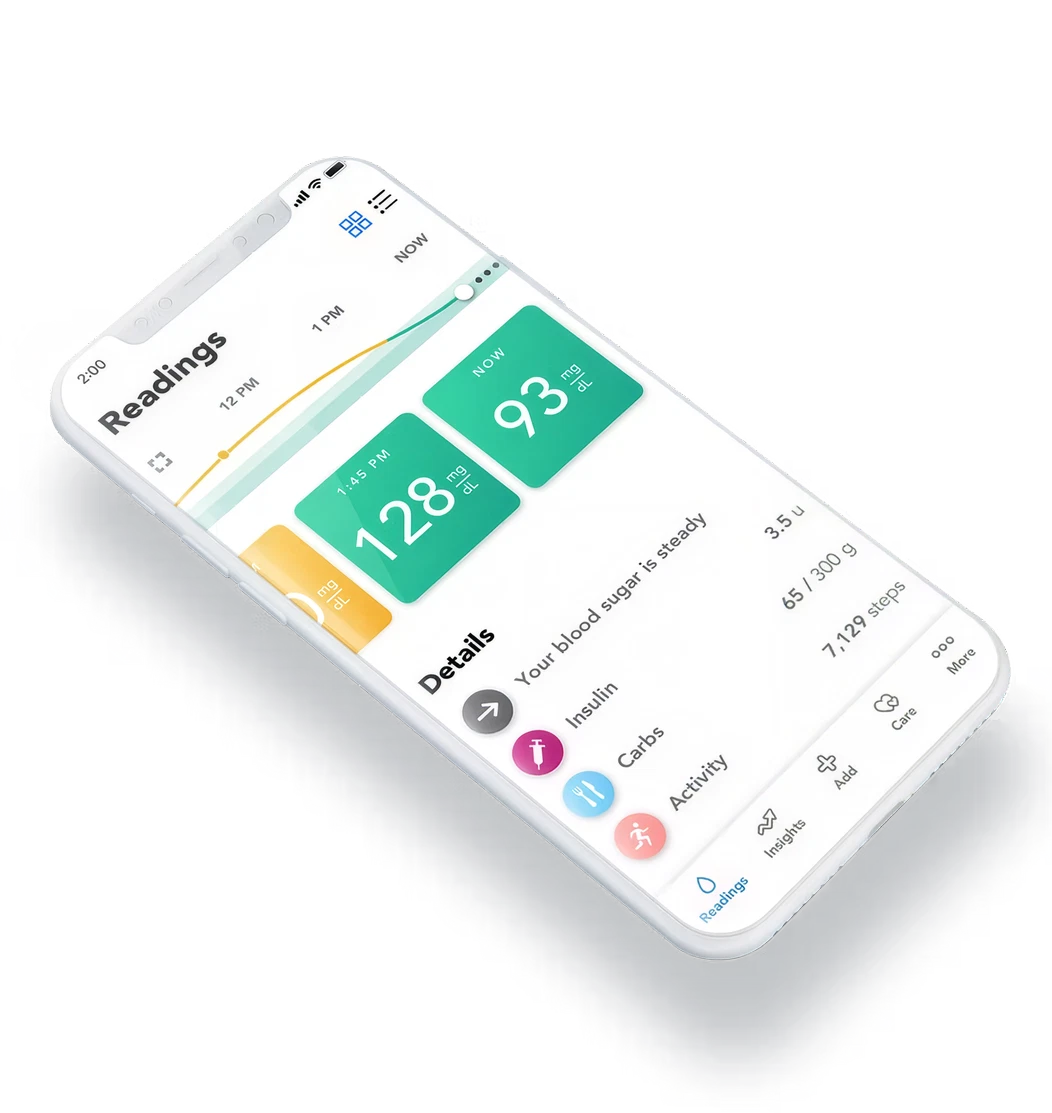
The Contour Diabetes App had been in the app store for several years. Developments in UI design, emerging CGM technology, and direct user feedback created an opportunity and responsibility to rethink the experience from the ground up.

Role

Product Designer (Solo)

Platform

iOS · Android · Concept

Focus

UX + Visual Redesign

The Project

This project was a speculative redesign to answer one question: What would the Contour app look like if we designed it today?

goals

  • Evolve the current app design to integrate with existing and emerging technologies, such as Continuous Glucose Monitoring (CGM)?
  • Explore the future of new UX standards, such as navigation, data entry, data visualization, and more
  • Find and alleviate current user pain points

Research & Discovery

Understanding the Spectrum of Users

Diabetes management is not one-size-fits-all. Users range from newly diagnosed patients relying entirely on finger-stick BGM, to experienced users integrating continuous CGM sensors. Each archetype has fundamentally different mental models, habits, and expectations.

The BGM User

Traditional

Finger-stick only

  • Logs readings manually throughout the day
  • Needs fast, low-friction entry - often testing mid-activity
  • Trusts familiar patterns; wary of change
  • Wants to see trends without learning a new system
  • Often older demographic, so accessibility matters

The CGM Early Adopter

Tech-forward

Continuous sensor

  • Gets readings automatically every few minutes
  • Wants rich visualization of trends, not just snapshots
  • Willing to explore; expects app to match sensor quality
  • Frustrated by apps that treat CGM data as an afterthought
  • Needs calibration flows that feel intuitive and reliable

Key Intentions That Shaped the Design

Accessible

Design for both BGM and CGM users in a single, unified experience without making either feel like second-class citizens.

Familiar

Build on the legacy of the current app. The redesign should feel evolved, not alien – familiar patterns, modernized execution.

Intelligent

Use AI and sensor data to shift from reactive logging to proactive guidance. The app should anticipate, not just record.

Effortless

Make entries effortless. Logging insulin, carbs, and activity should take seconds and not disrupt the user's day.

Systematic

Design a system, not just screens. Every

component should be reusable and adaptable

as the product evolves.

Intentional

Surface the right data at the right time and reduce cognitive load. Users shouldn't have to dig for what matters most right now.
The Updated Design

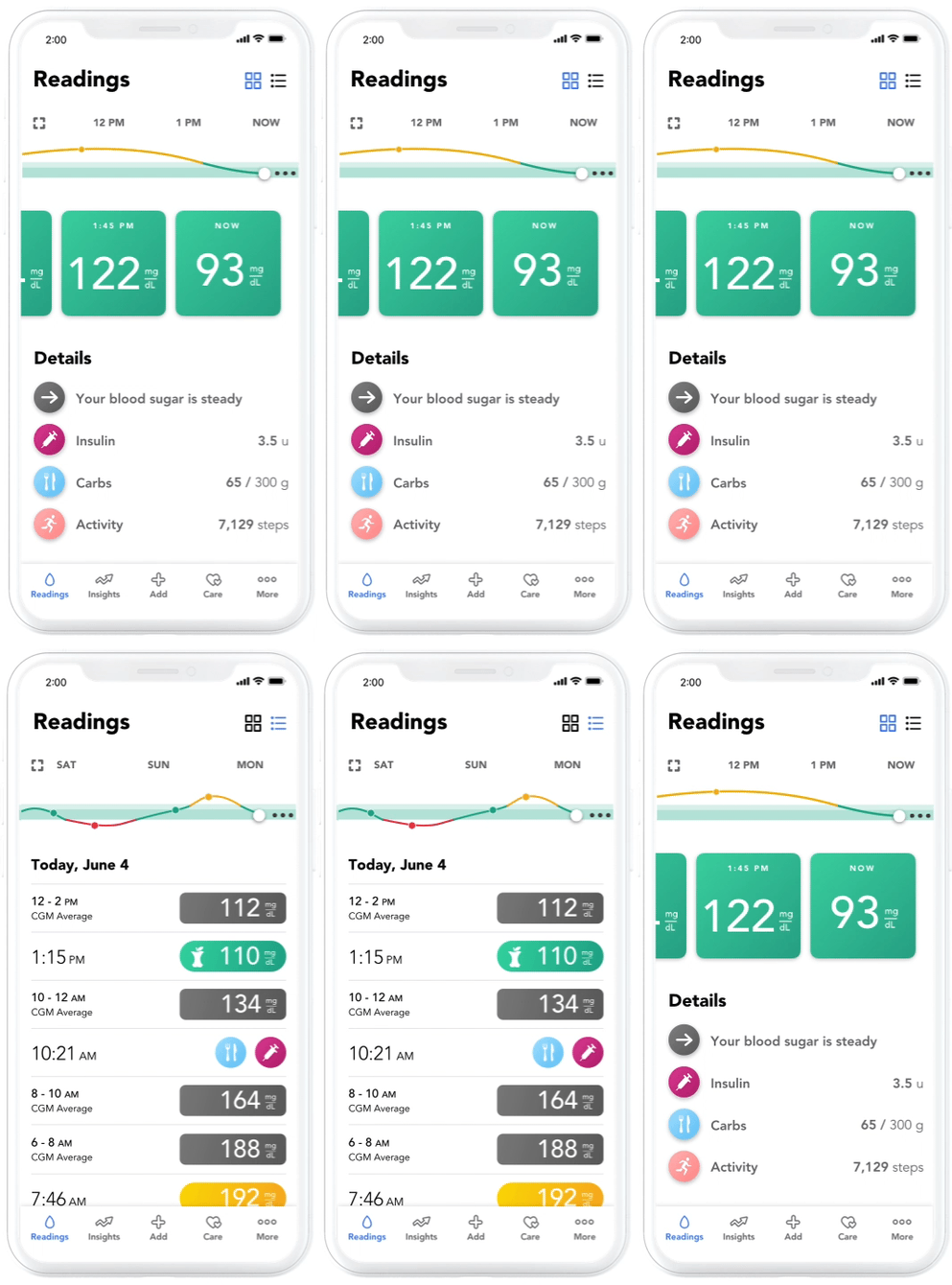
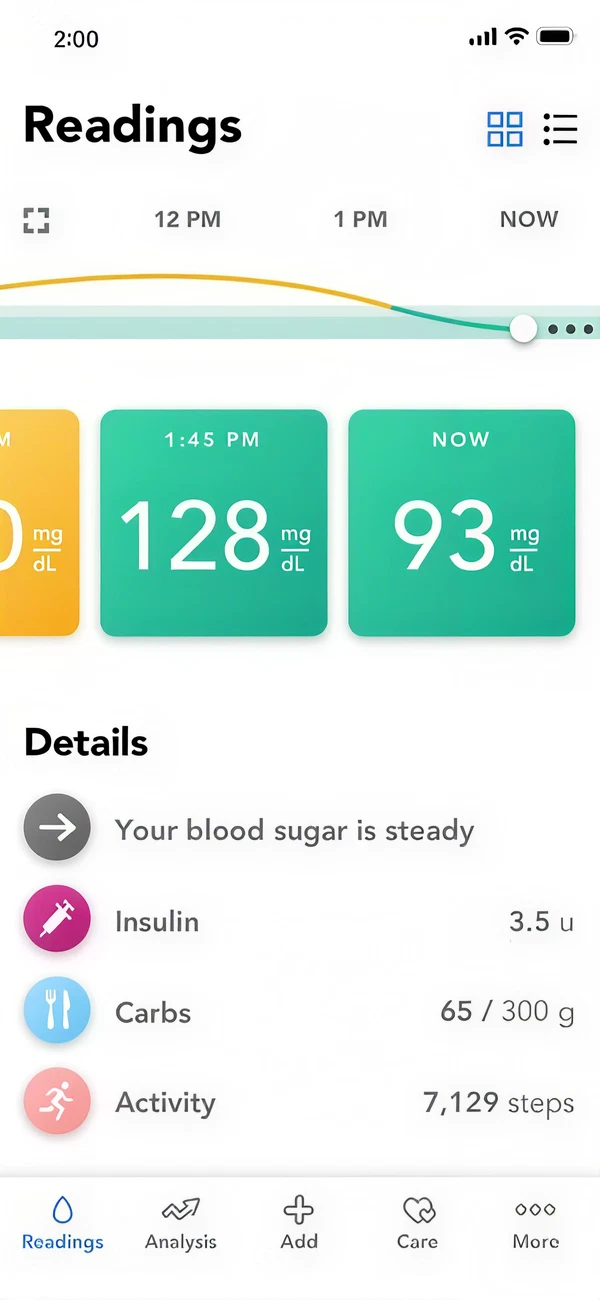
  • This evolution of the Contour Diabetes app creates a seamless integration of CGM and BGM data with an automatic transition between the two
  • The new interface is simple and builds on the legacy of the current app
  • Artificial intelligence allows the app to learn about the user and present a personalized experience
  • An extended user experience includes CGM insights delivered on smart watches
  • Presenting a clean and well-designed interface will set the app apart from the competition

Screens
Calibration

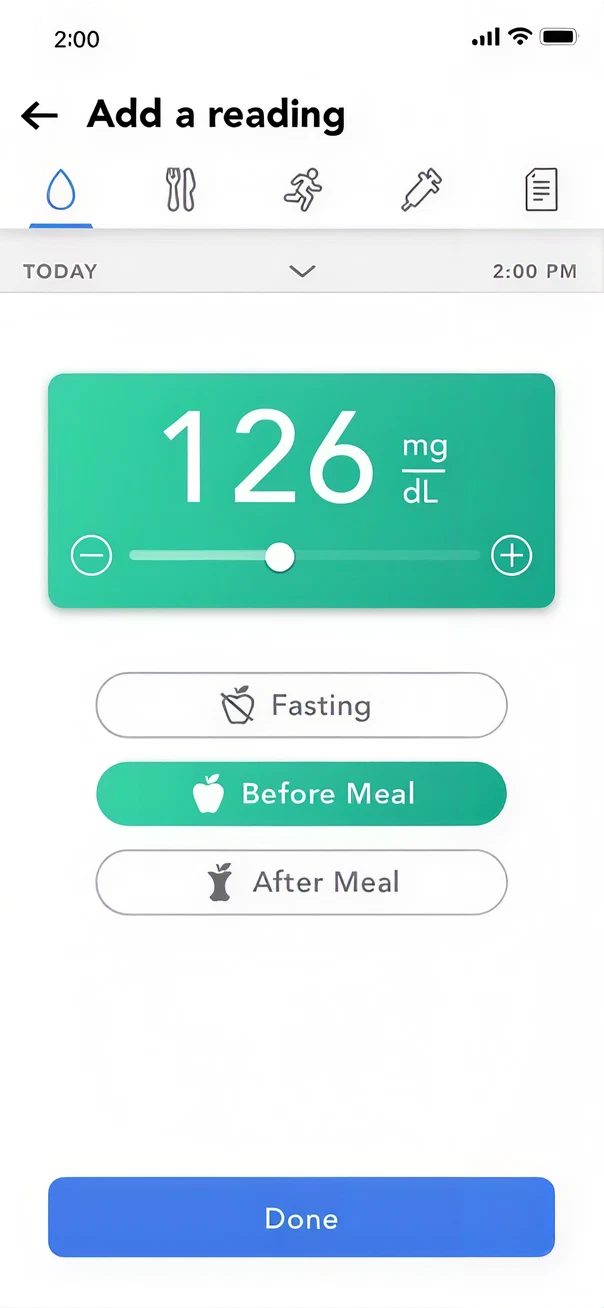
Calibration is simple and seamless when you connect and sync any Bluetooth-enabled Contour meter. 

Insights

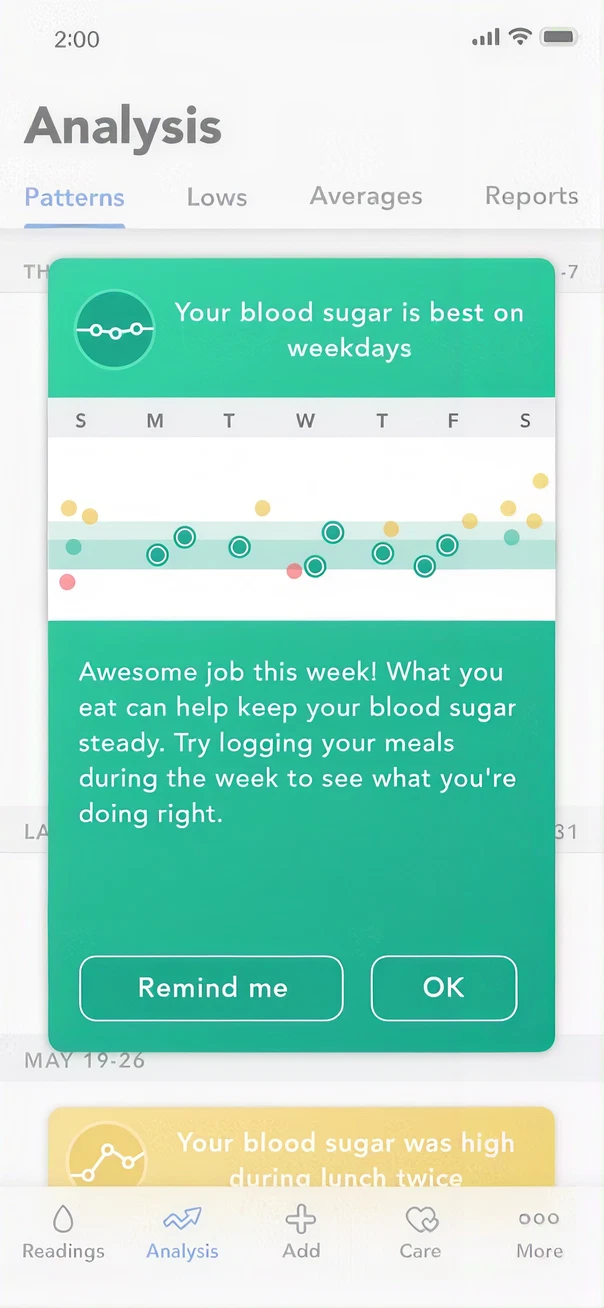
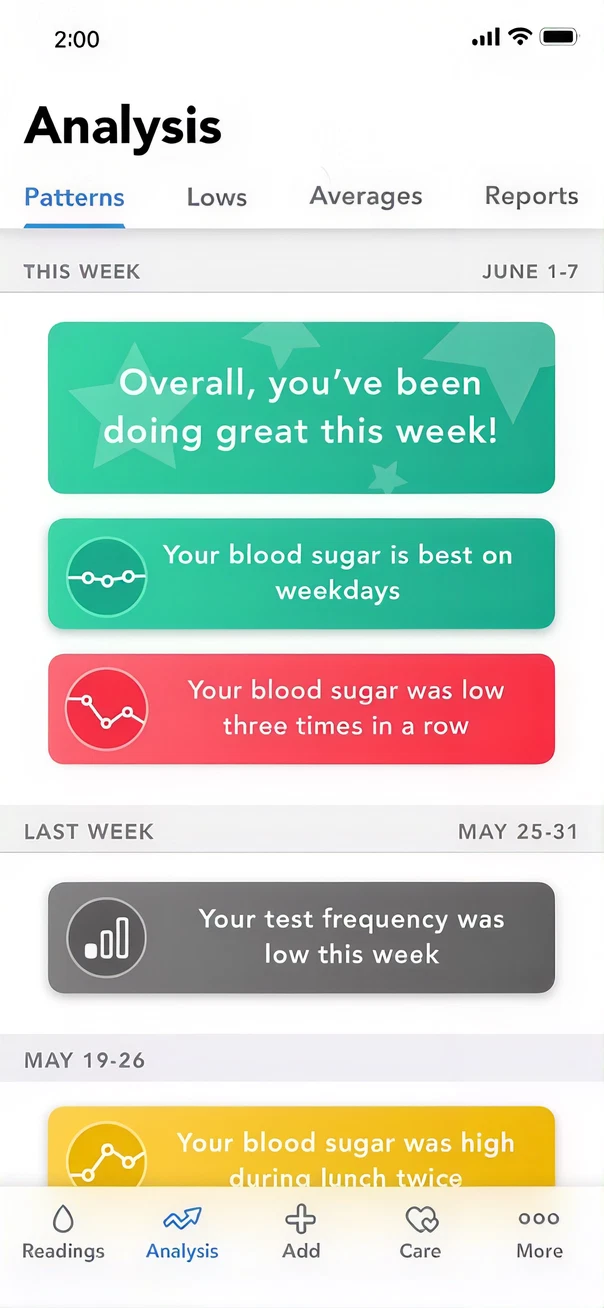
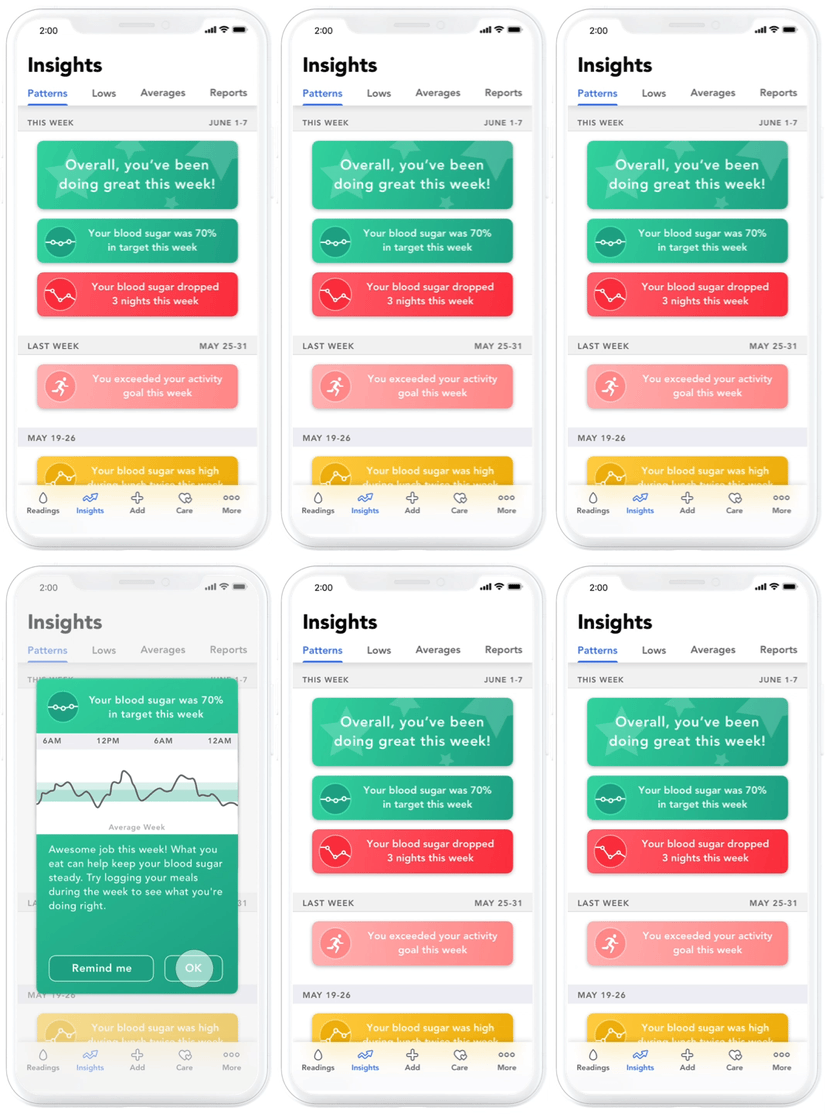
Users have access to intelligent insights, including streamlined Patterns that are tailored to CGM data

What I Learned & What's Next

Reflection

This project pushed me to design for an unfamiliar domain — medical devices — where the stakes of a poor UX decision are real. The biggest challenge wasn't the visual design. It was earning the trust of users whose relationship with this app is daily and deeply personal.

Designing for CGM integration also taught me to hold multiple user models simultaneously – the BGM user who logs manually and the CGM user for whom data is automatic. A good solution had to feel native to both, without being a compromise for either.

If I continued this work

  • User test the calibration flow with real CGM users – it's the highest-friction moment and the one I'm least confident in without feedback
  • Explore a widget and complications layer for Apple Watch – readings are exactly the kind of glanceable data that belongs on the wrist
  • Validate the AI insights framing: do users trust algorithmic pattern-detection, or does it feel presumptuous?
  • Build a full component library to support the system properly
  • Audit accessibility since high-contrast modes are essential in a medical context

interior define

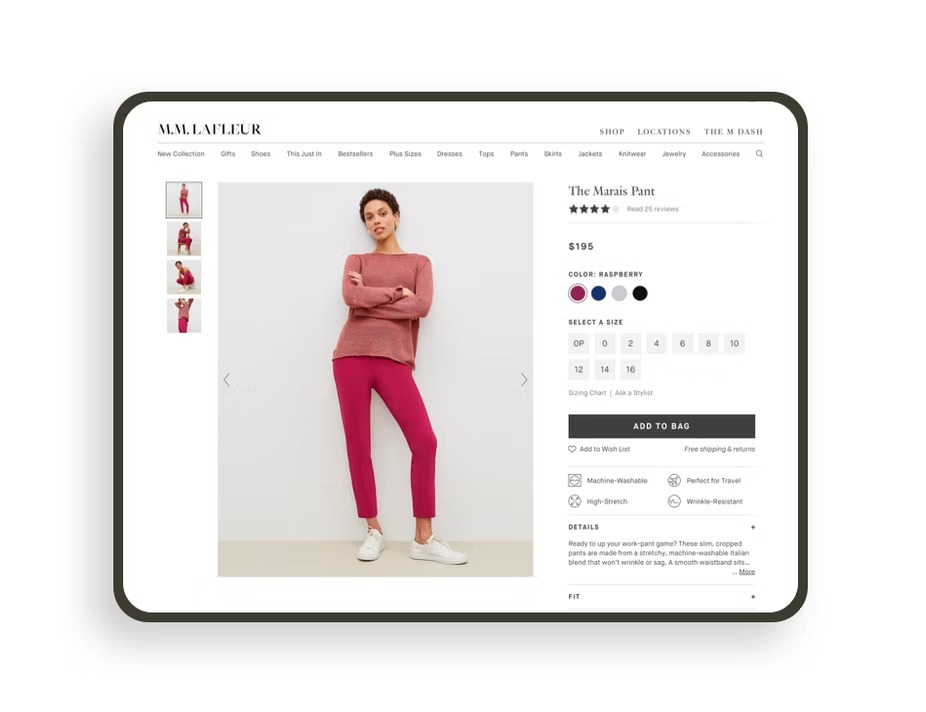
Product Detail Page

Explore

interior define

Category Pages

Explore

ascensia diabetes care

The Contour App, Redesigned.

The Contour Diabetes App had been in the app store for several years. Developments in UI design, emerging CGM technology, and direct user feedback created an opportunity and responsibility to rethink the experience from the ground up.

Role

Product Designer (Solo)

Platform

iOS · Android · Concept

Focus

UX + Visual Redesign

The Project

This project was a speculative redesign to answer one question: What would the Contour app look like if we designed it today?

goals

  • Evolve the current app design to integrate with existing and emerging technologies, such as Continuous Glucose Monitoring (CGM)?
  • Explore the future of new UX standards, such as navigation, data entry, data visualization, and more
  • Find and alleviate current user pain points

Research & Discovery

Understanding the Spectrum of Users

Diabetes management is not one-size-fits-all. Users range from newly diagnosed patients relying entirely on finger-stick BGM, to experienced users integrating continuous CGM sensors. Each archetype has fundamentally different mental models, habits, and expectations.

The BGM User

Traditional · Finger-stick only

  • Logs readings manually throughout the day
  • Needs fast, low-friction entry - often testing mid-activity
  • Trusts familiar patterns; wary of change
  • Wants to see trends without learning a new system
  • Often older demographic, so accessibility matters

The CGM Early Adopter

Tech-forward · Continuous sensor

  • Gets readings automatically every few minutes
  • Wants rich visualization of trends, not just snapshots
  • Willing to explore; expects app to match sensor quality
  • Frustrated by apps that treat CGM data as an afterthought
  • Needs calibration flows that feel intuitive and reliable

Key Intentions That Shaped the Design

Accessible

Design for both BGM and CGM users in a single, unified experience without making either feel like second-class citizens.

Familiar

Build on the legacy of the current app. The redesign should feel evolved, not alien – familiar patterns, modernized execution.

Intelligent

Use AI and sensor data to shift from reactive logging to proactive guidance. The app should anticipate, not just record.

Effortless

Make entries effortless. Logging insulin, carbs, and activity should take seconds and not disrupt the user's day.

Systematic

Design a system, not just screens. Every

component should be reusable and adaptable

as the product evolves.

Intentional

Surface the right data at the right time and reduce cognitive load. Users shouldn't have to dig for what matters most right now.

The Updated Design

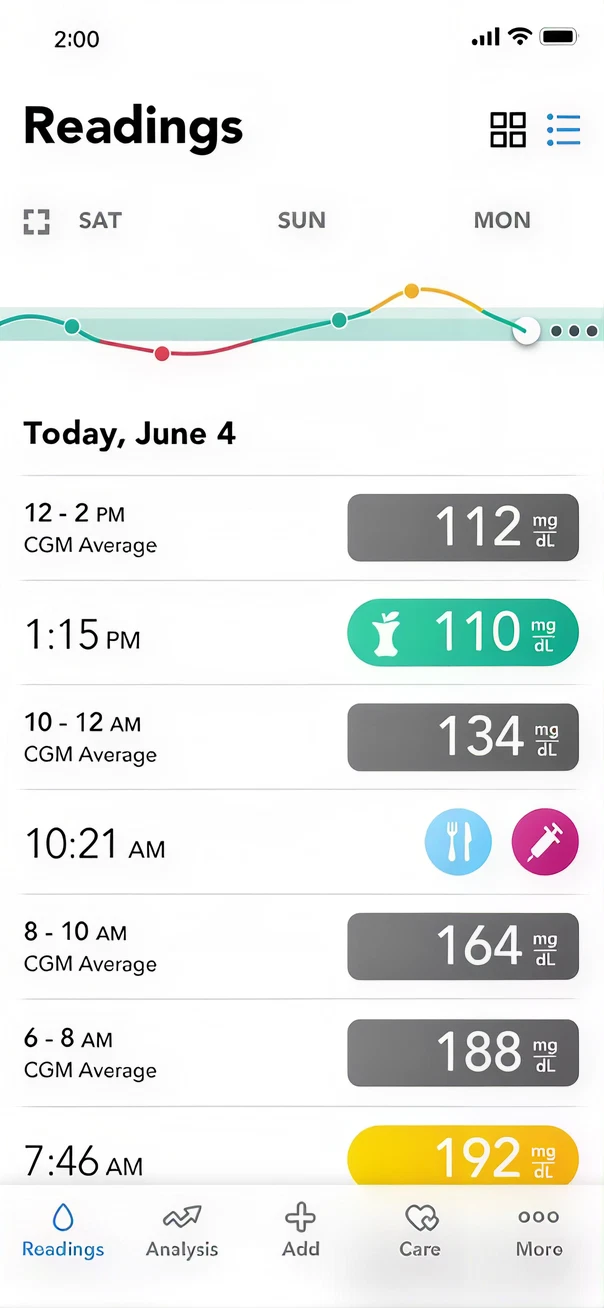
  • This evolution of the Contour Diabetes app creates a seamless integration of CGM and BGM data with an automatic transition between the two
  • The new interface is simple and builds on the legacy of the current app
  • Artificial intelligence allows the app to learn about the user and present a personalized experience
  • An extended user experience includes CGM insights delivered on smart watches
  • Presenting a clean and well-designed interface will set the app apart from the competition

Screens
Calibration

Calibration is simple and seamless when you connect and sync any Bluetooth-enabled Contour meter. 

Insights

Users have access to intelligent insights, including streamlined Patterns that are tailored to CGM data

What I Learned & What's Next

Reflection

This project pushed me to design for an unfamiliar domain — medical devices — where the stakes of a poor UX decision are real. The biggest challenge wasn't the visual design. It was earning the trust of users whose relationship with this app is daily and deeply personal.

Designing for CGM integration also taught me to hold multiple user models simultaneously – the BGM user who logs manually and the CGM user for whom data is automatic. A good solution had to feel native to both, without being a compromise for either.

If I continued this work

  • User test the calibration flow with real CGM users – it's the highest-friction moment and the one I'm least confident in without feedback
  • Explore a widget and complications layer for Apple Watch – readings are exactly the kind of glanceable data that belongs on the wrist
  • Validate the AI insights framing: do users trust algorithmic pattern-detection, or does it feel presumptuous?
  • Build a full component library to support the system properly
  • Audit accessibility since high-contrast modes are essential in a medical context

interior define

Product Detail Page

Explore

interior define

Category Pages

Explore

ascensia diabetes care

The Contour App, Redesigned.

The Contour Diabetes App had been in the app store for several years. Developments in UI design, emerging CGM technology, and direct user feedback created an opportunity and responsibility to rethink the experience from the ground up.

Role

Product Designer (Solo)

Platform

iOS · Android · Concept

Focus

UX + Visual Redesign

The Project

This project was a speculative redesign to answer one question: What would the Contour app look like if we designed it today?

goals

  • Evolve the current app design to integrate with existing and emerging technologies, such as Continuous Glucose Monitoring (CGM)?
  • Explore the future of new UX standards, such as navigation, data entry, data visualization, and more
  • Find and alleviate current user pain points

Research & Discovery

Understanding the Spectrum of Users

Diabetes management is not one-size-fits-all. Users range from newly diagnosed patients relying entirely on finger-stick BGM, to experienced users integrating continuous CGM sensors. Each archetype has fundamentally different mental models, habits, and expectations.

The BGM User

Traditional · Finger-stick only

  • Logs readings manually throughout the day
  • Needs fast, low-friction entry - often testing mid-activity
  • Trusts familiar patterns; wary of change
  • Wants to see trends without learning a new system
  • Often older demographic, so accessibility matters

The CGM Early Adopter

Tech-forward · Continuous sensor

  • Gets readings automatically every few minutes
  • Wants rich visualization of trends, not just snapshots
  • Willing to explore; expects app to match sensor quality
  • Frustrated by apps that treat CGM data as an afterthought
  • Needs calibration flows that feel intuitive and reliable

Key Intentions That Shaped the Design

Accessible

Design for both BGM and CGM users in a single, unified experience without making either feel like second-class citizens.

Familiar

Build on the legacy of the current app. The redesign should feel evolved, not alien – familiar patterns, modernized execution.

Intelligent

Use AI and sensor data to shift from reactive logging to proactive guidance. The app should anticipate, not just record.

Effortless

Make entries effortless. Logging insulin, carbs, and activity should take seconds and not disrupt the user's day.

Systematic

Design a system, not just screens. Every

component should be reusable and adaptable

as the product evolves.

Intentional

Surface the right data at the right time and reduce cognitive load. Users shouldn't have to dig for what matters most right now.

The Updated Design

  • This evolution of the Contour Diabetes app creates a seamless integration of CGM and BGM data with an automatic transition between the two
  • The new interface is simple and builds on the legacy of the current app
  • Artificial intelligence allows the app to learn about the user and present a personalized experience
  • An extended user experience includes CGM insights delivered on smart watches
  • Presenting a clean and well-designed interface will set the app apart from the competition

Screens
Calibration

Calibration is simple and seamless when you connect and sync any Bluetooth-enabled Contour meter. 
Insights

Users have access to intelligent insights, including streamlined Patterns that are tailored to CGM data

What I Learned & What's Next

Reflection

This project pushed me to design for an unfamiliar domain — medical devices — where the stakes of a poor UX decision are real. The biggest challenge wasn't the visual design. It was earning the trust of users whose relationship with this app is daily and deeply personal.

Designing for CGM integration also taught me to hold multiple user models simultaneously – the BGM user who logs manually and the CGM user for whom data is automatic. A good solution had to feel native to both, without being a compromise for either.

If I continued this work

  • User test the calibration flow with real CGM users – it's the highest-friction moment and the one I'm least confident in without feedback
  • Explore a widget and complications layer for Apple Watch – readings are exactly the kind of glanceable data that belongs on the wrist
  • Validate the AI insights framing: do users trust algorithmic pattern-detection, or does it feel presumptuous?
  • Build a full component library to support the system properly
  • Audit accessibility since high-contrast modes are essential in a medical context
interior define

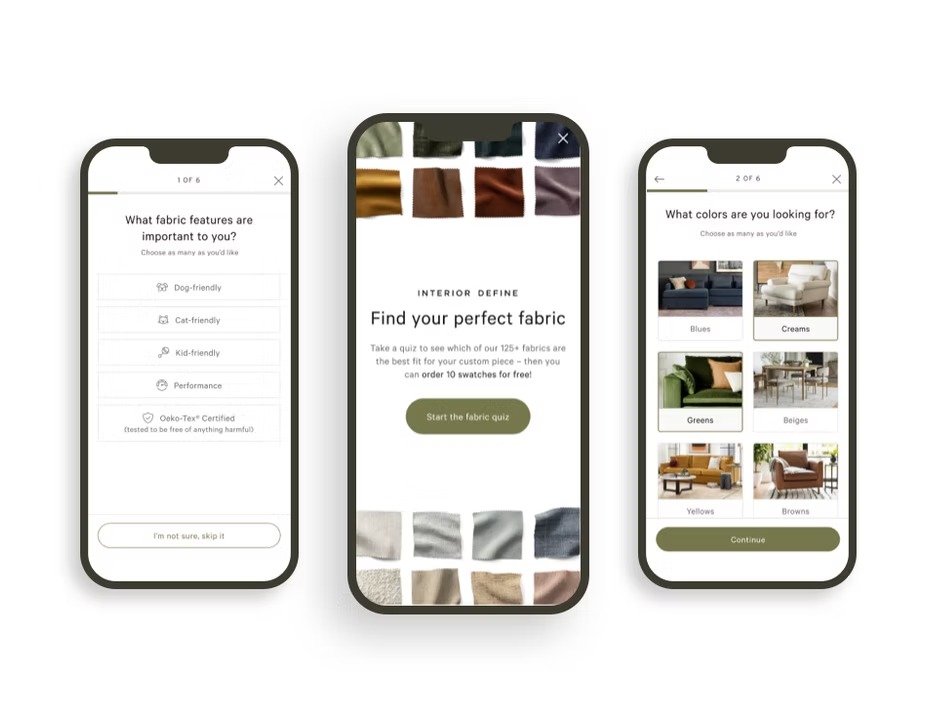
Fabric Quiz

Explore

interior define

Product Detail Page

Explore

interior define

Category Pages

Explore